
Minggu, 19 Oktober 2014

Senin, 13 Oktober 2014
initramfs
(initramfs) _
Booting into “Recovery Mode” as well as choosing the other kernels listed in grub didn’t help at all.
Solution:
1. Boot from the Ubuntu Live CD;
2. Open/Run Terminal;
3. Type: sudo fdisk -l (to get the device name) then press ENTER;
Disk /dev/sda: 250.1 GB, 250059350016 bytes
255 heads, 63 sectors/track, 30401 cylinders
Units = cylinders of 16065 * 512 = 8225280 bytes
Disk identifier: **********
Device Boot Start End Blocks Id System
/dev/sda1 * 1 30238 242886703+ 83 Linux
/dev/sda2 30239 30401 1309297+ 5 Extended
/dev/sda5 30239 30401 1309266 82 Linux swap / Solaris
The device name for my friend’s system based on the above: /dev/sda1
4. Type: sudo fsck /dev/sda1 then press ENTER;
5. Restart the system and boot normally.
* The laptop booted normally after the fix.
Booting into “Recovery Mode” as well as choosing the other kernels listed in grub didn’t help at all.
Solution:
1. Boot from the Ubuntu Live CD;
2. Open/Run Terminal;
3. Type: sudo fdisk -l (to get the device name) then press ENTER;
Disk /dev/sda: 250.1 GB, 250059350016 bytes
255 heads, 63 sectors/track, 30401 cylinders
Units = cylinders of 16065 * 512 = 8225280 bytes
Disk identifier: **********
Device Boot Start End Blocks Id System
/dev/sda1 * 1 30238 242886703+ 83 Linux
/dev/sda2 30239 30401 1309297+ 5 Extended
/dev/sda5 30239 30401 1309266 82 Linux swap / Solaris
The device name for my friend’s system based on the above: /dev/sda1
4. Type: sudo fsck /dev/sda1 then press ENTER;
5. Restart the system and boot normally.
* The laptop booted normally after the fix.
Minggu, 21 September 2014
daftar link tv online
Berikut Link nya :
RCTI = rtsp://edge.okeinfo.net/live/mnc_myu_new1.stream
GLOBAL TV = rtsp://edge.okeinfo.net/live/mnc_myu_new2.stream
MNC TV = rtsp://edge.okeinfo.net/live/mnc_myu_new3.stream
SINDO TV = rtsp://edge.okeinfo.net/live/mnc_myu_new4.stream
MNC NEWS = rtsp://edge.okeinfo.net/live/mnc_myu_new5.stream
Mnc Entertainment = rtsp://edge.okeinfo.net/live/mnc_myu_new6.stream
Mnc lifestyle = rtsp://edge.okeinfo.net/live/mnc_myu_new7.stream
MNC bussines = rtsp://edge.okeinfo.net/live/mnc_myu_new8.stream
MNC MUSLIM = rtsp://edge.okeinfo.net/live/mnc_myu_new9.stream
Mnc Musik = rtsp://edge.okeinfo.net/live/mnc_myu_new10.stream
Mnc Sport 1 = rtsp://edge.okeinfo.net/live/mnc_myu_new11.stream
Mnc Shop = rtsp://edge.okeinfo.net/live/mnc_myu_new12.stream
Mnc Sport 2 = rtsp://edge.okeinfo.net/live/mnc_myu_new13.stream
TRANS7 = rtsp://live.mytrans.com/live/trans7@5.sdp
TRANS TV = rtsp://live.mytrans.com/live/transtv@5.sdp
B CHANNEL = rtsp://118.97.183.198:1935/live/_definst_/bchannel
ARENA TV = rtsp://118.97.183.198:1935/live/arena
TV EDUKASI = rtsp://118.97.183.198:1935/live/tvedukasi
ALJAZEERA TV = rtsp://118.97.183.198:1935/live/aljazeera
ALQURAN KAREEM TV = rtsp://118.97.183.198:1935/live/alquran
TVRI NASIONAL= rtsp://118.97.50.102:1935/live/stream1.sdp
TVRI EDUKASI = rtsp://118.97.50.102:1935/live/stream2.sdp
TVRI BUDAYA = rtsp://118.97.50.102:1935/live/stream3.sdp
TVRI OLAHRAGA = rtsp://118.97.50.102:1935/live/stream4.sdp
ANTV = rtsp://118.97.96.17:1935/live/antv
TVONE = rtsp://118.97.96.17:1935/live/tvone
KOMPAS TV = rtsp://202.137.11.52:1935/jakarta/offair.sdp
METRO TV = rtsp://202.158.49.58:1935/mobile/video_source
Ochannel = rtsp://202.58.124.140:1935/oc/octv
INDOSIAR = rtsp://202.58.124.147:1935/indolive/indolive_256
SCTV = rtsp://202.58.124.147:1935/sclive/sclive_256
LBS MOVIE = rtsp://cdn.mivo.tv/mivotvjkt/lmovie1
LBS DRAMA = rtsp://cdn.mivo.tv/mivotvjkt/ldrama1
LBS MUSIC = rtsp://cdn.mivo.tv/mivotvjkt/lmusic1
LUNAR TV = rtsp://cdn.mivo.tv/mivotvjkt/lunartv1
DAAI TV = rtsp://cdn.mivo.tv/mivotvjkt/daaitv2
sumber http://asoka-site.blogspot.com/
RCTI = rtsp://edge.okeinfo.net/live/mnc_myu_new1.stream
GLOBAL TV = rtsp://edge.okeinfo.net/live/mnc_myu_new2.stream
MNC TV = rtsp://edge.okeinfo.net/live/mnc_myu_new3.stream
SINDO TV = rtsp://edge.okeinfo.net/live/mnc_myu_new4.stream
MNC NEWS = rtsp://edge.okeinfo.net/live/mnc_myu_new5.stream
Mnc Entertainment = rtsp://edge.okeinfo.net/live/mnc_myu_new6.stream
Mnc lifestyle = rtsp://edge.okeinfo.net/live/mnc_myu_new7.stream
MNC bussines = rtsp://edge.okeinfo.net/live/mnc_myu_new8.stream
MNC MUSLIM = rtsp://edge.okeinfo.net/live/mnc_myu_new9.stream
Mnc Musik = rtsp://edge.okeinfo.net/live/mnc_myu_new10.stream
Mnc Sport 1 = rtsp://edge.okeinfo.net/live/mnc_myu_new11.stream
Mnc Shop = rtsp://edge.okeinfo.net/live/mnc_myu_new12.stream
Mnc Sport 2 = rtsp://edge.okeinfo.net/live/mnc_myu_new13.stream
TRANS7 = rtsp://live.mytrans.com/live/trans7@5.sdp
TRANS TV = rtsp://live.mytrans.com/live/transtv@5.sdp
B CHANNEL = rtsp://118.97.183.198:1935/live/_definst_/bchannel
ARENA TV = rtsp://118.97.183.198:1935/live/arena
TV EDUKASI = rtsp://118.97.183.198:1935/live/tvedukasi
ALJAZEERA TV = rtsp://118.97.183.198:1935/live/aljazeera
ALQURAN KAREEM TV = rtsp://118.97.183.198:1935/live/alquran
TVRI NASIONAL= rtsp://118.97.50.102:1935/live/stream1.sdp
TVRI EDUKASI = rtsp://118.97.50.102:1935/live/stream2.sdp
TVRI BUDAYA = rtsp://118.97.50.102:1935/live/stream3.sdp
TVRI OLAHRAGA = rtsp://118.97.50.102:1935/live/stream4.sdp
ANTV = rtsp://118.97.96.17:1935/live/antv
TVONE = rtsp://118.97.96.17:1935/live/tvone
KOMPAS TV = rtsp://202.137.11.52:1935/jakarta/offair.sdp
METRO TV = rtsp://202.158.49.58:1935/mobile/video_source
Ochannel = rtsp://202.58.124.140:1935/oc/octv
INDOSIAR = rtsp://202.58.124.147:1935/indolive/indolive_256
SCTV = rtsp://202.58.124.147:1935/sclive/sclive_256
LBS MOVIE = rtsp://cdn.mivo.tv/mivotvjkt/lmovie1
LBS DRAMA = rtsp://cdn.mivo.tv/mivotvjkt/ldrama1
LBS MUSIC = rtsp://cdn.mivo.tv/mivotvjkt/lmusic1
LUNAR TV = rtsp://cdn.mivo.tv/mivotvjkt/lunartv1
DAAI TV = rtsp://cdn.mivo.tv/mivotvjkt/daaitv2
sumber http://asoka-site.blogspot.com/
Rabu, 27 Agustus 2014
show login root gui ubuntu 1404
$ su -
Password:
su: Authentication failure

Enable super user account password on Ubuntu

First, set a password for root user as shown below.

$ sudo passwd root
[sudo] password for user:
Enter new UNIX password:
Retype new UNIX password:
passwd: password updated successfully
untuk memunculkanya buka terminal
sudo gedit /etc/lightdm/lightdm.conf
tambahkan baris
[SeatDefaults]
greeter-show-manual-login=true
lalu save
Rabu, 18 Juni 2014
versi ubuntu via terminal
Untuk melihat secara detail, kita harus melihat melalui terminal.
Pertama-tama buka terminal dan ketikkan perintah ini.
$ cat /etc/lsb-release
atau menggunakan perintah ini.
$ lsb_release -c
Untuk melihat urutan ke berapa Ubuntu yang kita pakai di rilis, ketikkan perintah ini.
$ lsb_release -d
atau ini.
$ lsb_release -r
Untuk melihat secara detail, ketik perintah ini.
$ lsb_release -a
Pertama-tama buka terminal dan ketikkan perintah ini.
$ cat /etc/lsb-release
atau menggunakan perintah ini.
$ lsb_release -c
Untuk melihat urutan ke berapa Ubuntu yang kita pakai di rilis, ketikkan perintah ini.
$ lsb_release -d
atau ini.
$ lsb_release -r
Untuk melihat secara detail, ketik perintah ini.
$ lsb_release -a
Recovery Mode ubuntu
To start Ubuntu into safe mode (Recovery Mode) hold down the left Shift key as the computer starts to boot. If holding the Shift key doesn't display the menu press the Esc key repeatedly to display the GRUB 2 menu. From there you can choose the recovery option

Selasa, 10 Juni 2014
perintah dasar terminal ubuntu
Perintah Dasar Linux
Berikut
beberapa perintah dasar di Linux. Posting ini akan selalu diupdate
setiap harinya sebagai langkah penyempurnaan yang nantinya saya harap
bisa menjadi cheatsheet bagi Linuxer.
Ccal = menampilkan kalender
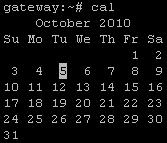
Output Perintah cal pada Linux
berikut ini adalah beberapa opsi perintah cal yang bisa digunakan:
-3 : melihat bulan sebelum, saat ini, dan yang akan datang
-y : menampilkan bulan tahun ini
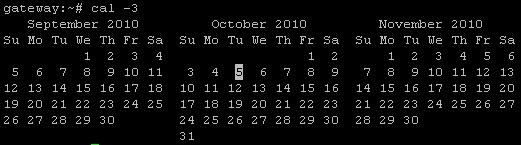
Output Perintah cal -3 pada Linux
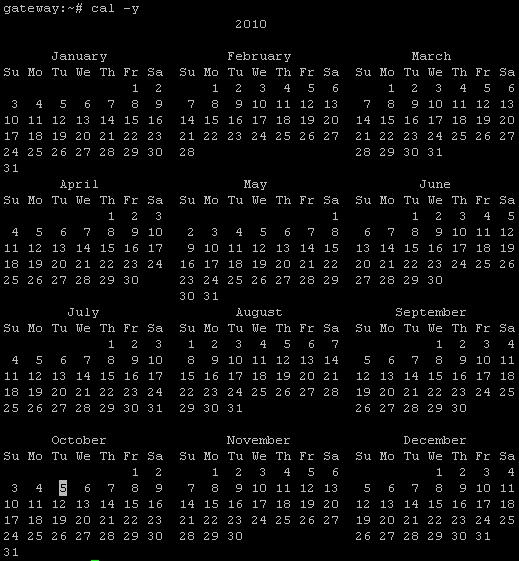
Output Perintah cal -y pada Linux
bisa juga dengan memberikan parameter bulan dan tahun setelah perintah cal
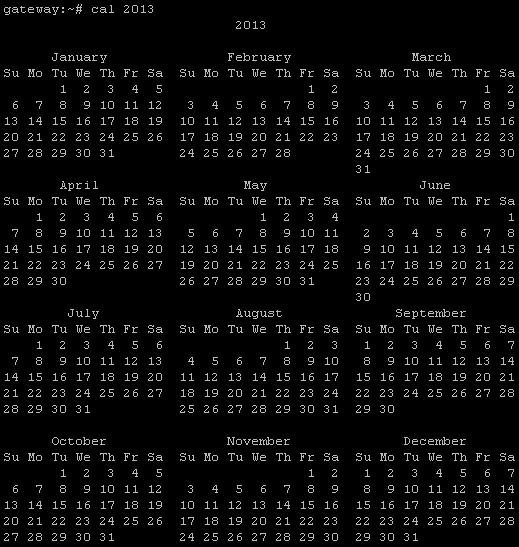
Output Perintah cal dengan Parameter Tahun pada Linux
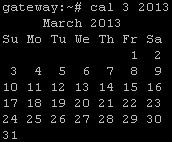
Output Perintah cal dengan Parameter Bulan dan Tahun pada Linux
cat = melihat isi file
cd = pindah directory
chmod = memodifikasi file atau directory permission
chown = memodifikasi file atau directory ownership
clear = menghapus layar terminal
cp = mengopy file atau directory
D
date = menampilkan tanggal
df = report penggunaan space hardisk
dhclient = mendapatkan ip dhcp
dir = melihat isi directory
du = estimasi ukuran file
E
echo = menampilkan text
eject = eject removable media
exit = keluar dari terminal console
F
fdisk = partition table manipulator
find = pencarian file
free = menampilkan penggunaan memory pada system
ftp = melakukan koneksi ke ftp server
G
groupadd = menambah group
groupdel = menghapus group
groupmod = memodifikasi group
H
halt = mematikan system
hostname = menampilkan atau men-set hostname system
I
ifconfig = mengkonfigurasi atau melihat konfigurasi interface
ifdown = take a network interface down
ifup = take a network interface up
ip = menampilkan atau memanipulasi device, routing. policy routing dan tunnel
iptables = mengkonfigurasi iptables (IPv4 packet filtering and NAT)
iptables-apply = update iptables dari remote
iptables-restore = restore konfigrasi iptables
iptables-save = menyimpan konfigurasi iptables
K
kill = mengirim signal ke sebuah proses
killall = mematikan proses berdasarkan nama proses
L
last = menampilkan list user login terakhir
ln = membuat link file
ls = melihat isi directory
M
man = menampilkan manual suatu command
mkdir = membuat directory
mount = mount file system
mv = memindahkan atau me-rename file atau directory
P
passwd = mengganti password user
pwd = melihat directory saat ini
R
reboot = reboot/restart system
rm = menghapus file
rmdir = menghapus directory
route = menampilkan atau memanipulasi routing table
S
su = pindah user ID atau menjadi superuser
T
tail = menampilkan 10 baris terakhir suatu file
tar = archiving utility
top = menampilkan task (seperti Windows task manager)
touch = membuat file kosong baru
U
useradd = create user baru
userdel = menghapus user
usermod = modifikasi user
users = menampilkan username user yang login
W
w = melihat informasi user yang login dan task yang sedang dijalankan masing – masing user
whatis = menampilkan deskripsi singkat manual page
wc = menghitung kata, baris dalam file
wget = download file dari URL
whereis = menampilkan lokasi file binary, source, dan manual sebuah perintah
who = melihat informasi user yang login
whoami = menampilkan informasi user ID saat ini
sumber disini
Langganan:
Postingan (Atom)